Dependency Injection | Part 2
Start developing with C#
Let’s continue and break it down a little more…
This is a full application using dependency injection (DI), and it’s written entirely in one file: Program.cs.
File Structure
Here's a simplified view of what the file structure looks like:
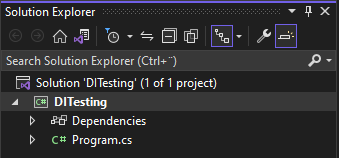
Program.cs
At the top of the file, we’re importing a NuGet package called SimpleInjector:
SimpleInjector helps us set up and manage dependencies easily. It gives us a container where we register everything we want the app to know how to "inject" later on. There are other DI frameworks, for example Microsoft.Extensions.DependencyInjection is very common, but we’ll stick with SimpleInjector for now because it’s simple and easy to use.
What’s happening in Main?
We’ll explain each part soon, but first, take a look at the full program:
Here’s a breakdown:
We create a container.
We register a few types: some interfaces with their matching implementations.
We ask the container to give us a ModelService instance.
We call a method on that service and print the names of the models returned.
What’s a Model?
A model usually represents a table in a database. For example, customer_table, employee_table, or product_table.
The Id field is very common in database models and often becomes the primary key automatically when using frameworks like Entity Framework (ORM).
You can also use attributes like [Key] to mark it explicitly:
Let's continue and create a Service that will use this model.
ModelService — this is where DI happens
This service depends on a database context (IDbContext) — but we don’t create the context ourselves. Instead, the container injects it for us.
Let's also create a second class for returning a specific name of a model:
Implementing the interfaces This is the part where Dependency Inversion Principle (DIP) and Dependency Injection (DI) really show up.
Let’s break it down.
DbContext – implements IDbContext
This class depends on an IConnection, which we’ll create next. It also creates a dummy list of models.
Configuration with AppConnectionSettings This is where we fake a database connection string:
In a real app, this would come from something like appsettings.json or environment variables.
Interfaces (Abstractions)
These interfaces describe what the implementations must provide, but don’t include any logic themselves. This makes the app flexible — we can swap out one implementation for another without changing the rest of the code.
Final Thoughts This small example shows how to:
Use SimpleInjector to manage dependencies
Register interfaces and classes in a container
Separate logic across different files
Use dependency injection to make the code easier to test and maintain
We'll build on this by using appsettings.json and a more complete file structure in future parts.
.... More to come...